



























Razer Blade 18"s
We have found 0 Razer Blade 18"s. They are pre-owned from 0 different sites. Compare high-performance gaming and creator laptops across multiple sellers to find the best pre-owned option for your needs. Read more
0 Deals

Your search did not match any deals...
Razer Blade 18"s at a glance 🔍
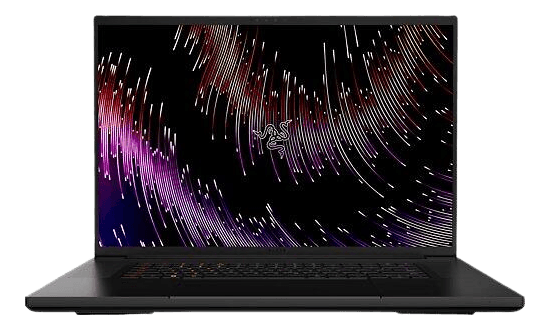
Find Razer Blade 18"s listings alongside other laptops on our Laptops category. The Blade 18 is Razer’s largest laptop in the Blade family, built for gamers and creators who want a big screen and desktop-class performance in a portable chassis.
Why choose a pre-owned Razer Blade 18? ⚡
- Better value: high-end components for less than the original retail price.
- More options: different specs, storage sizes, and sellers to compare.
- Faster upgrade path: buy a well-spec’d unit now and sell or trade later.
Key features and benefits 💡
- Large 18-inch display for immersive gaming and editing. Bigger screen area improves productivity and immersion.
- High-refresh-rate panels (common in this model) for smoother gameplay and reduced motion blur.
- Top-tier graphics options, often from the Nvidia RTX 40-series family, for high frame rates and ray tracing.
- Fast NVMe SSDs and 16–64 GB RAM options for quick load times and multitasking.
- Premium aluminium chassis and per-key RGB keyboard for durability and customisable lighting.
Models in the Razer Blade family 🔗
Razer offers several sizes and lines. If you want slightly smaller or more portable alternatives, consider:
- Razer Blade 16" — a balance between screen size and mobility.
- Razer Blade 17 17,3" — close to the 18" in power, slightly smaller display.
- Razer Blade 15" — more portable while still powerful.
- Razer Book 13" — focused on productivity and battery life rather than raw gaming power.
- Razer Blade Stealth 13,3" — ultra-portable option for everyday use.
| Model | Best for | Screen size | Typical buyer |
|---|---|---|---|
| Razer Blade 18" | Maximum screen and performance | 18 in (46 cm) | Gamers and creators who want desktop-class power |
| Razer Blade 17 | High power, slightly more portable | 17.3 in (44 cm) | Users who need power but prefer a smaller footprint |
| Razer Blade 16 | Balanced performance and portability | 16 in (41 cm) | Gamers who travel often |
| Razer Blade 15 | Portable gaming | 15.6 in (39.6 cm) | Those wanting power in a compact size |
How the Blade 18 compares to other models 📊
The Blade 18 prioritises screen real estate and cooling to support higher-end GPUs. Choose the 18" if you value a larger display and the best possible sustained performance. Pick 15" or 16" for lighter travel weight. The Razer Book and Blade Stealth focus on battery life and portability rather than peak graphics performance.
Price range and how to compare 💰
There are currently available pre-owned products priced between and . Use the price filter to find options near your budget, then compare RAM, storage, GPU and seller delivery to understand total value. Pay attention to included accessories such as chargers or original boxes, which can affect overall value.
Buying guide: things to consider 📝
- Performance needs: match the GPU and CPU to the games or apps you use. Higher GPUs suit 3D work and high-frame gaming.
- Storage: NVMe SSDs are much faster than SATA; 512 GB is a common minimum, 1 TB for large libraries.
- RAM: 16 GB is fine for gaming; 32 GB or more helps creators and heavy multitaskers.
- Thermals and noise: larger chassis like the 18" often run cooler under load than smaller laptops.
- Battery life: high-performance components reduce battery runtime—expect shorter unplugged use compared with ultraportables.
- Warranty and return policy: check the selling site’s terms for returns and warranty coverage.
- Filters to use: price, condition, brand, RAM, storage and processor help narrow results quickly.
Quick checklist before you follow a listing ✅
- Confirm the exact model and GPU listed.
- Compare RAM and storage against your needs.
- Read the seller’s delivery and returns terms on their site.
- Look for units with the accessories you want, such as original charger.
Common questions ❓
Is a pre-owned Razer Blade 18 reliable?
Reliability depends on condition and how the unit was used. Look for listings with detailed specs and a clear seller warranty or returns policy. Larger chassis and premium cooling often mean longer sustained performance.
How do I choose the right GPU for gaming?
Match the GPU to the games and settings you want. For 1080p high-frame gaming, mid-to-high GPUs are enough. For 1440p or ray tracing at high settings, choose a top-tier GPU. Compare listings by GPU model and pair with sufficient RAM.
Can I upgrade RAM or storage later?
Many Blade models allow upgrades to SSD and sometimes RAM. Check the specific listing and the seller’s product page for upgrade options and compatibility before you buy.
Explore available listings and click through to the selling site to view full specs and buy. Find and buy Razer Blade 18"s via Relovie – the largest collection of pre-owned and refurbished electronics online.